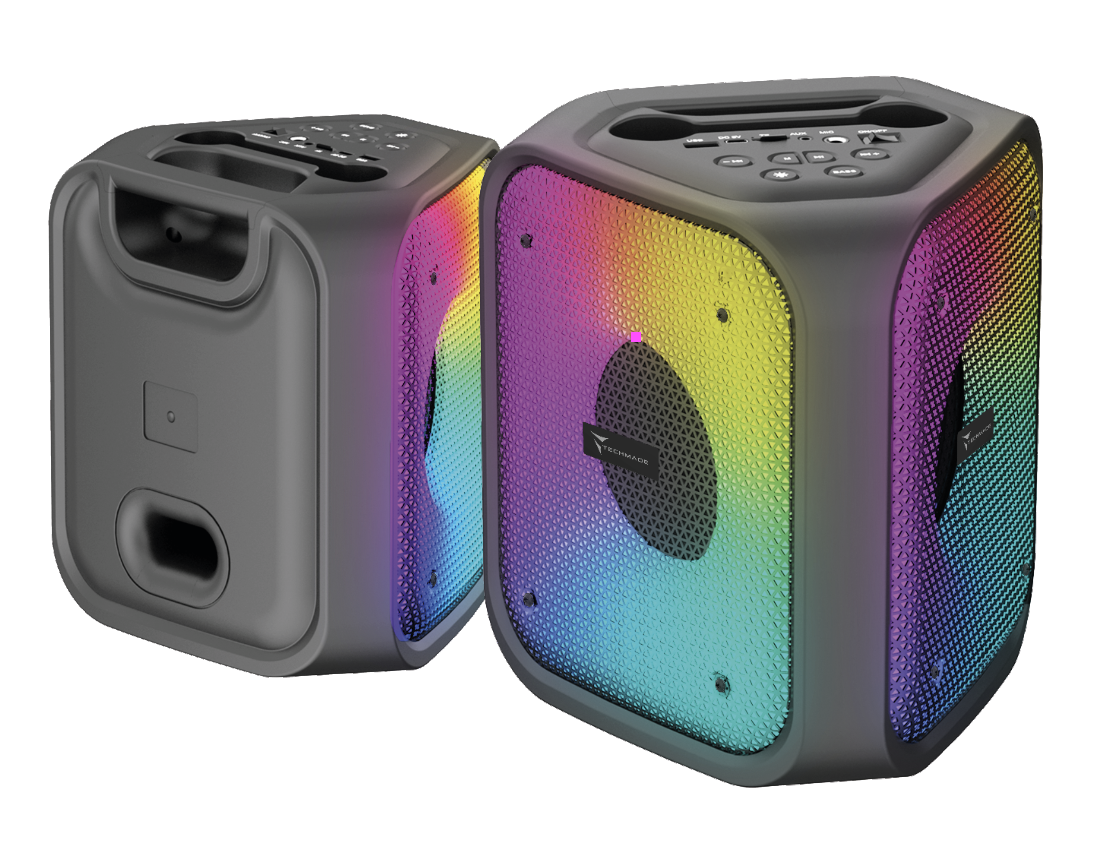
KARAOKE SPEAKER
TM-JBK1406M
USER MANUAL
TECHMADE S.R.L
Product Code/Ref.: TM-JBK1406M
Description: Karaoke Speaker Working temperature: 0° C to 50° C
Brand: Techmade
Srl
BT Name: TM-JBK1406M
Warnings
Please read this manual carefully and keep it for future
reference.
All essential test series have been performed and the above
mentioned product complies with all legal requirements.
Limitations in intended use or foreseeable misuse.
1. Do not disassemble the device. If repairs are necessary,
contact a Techmade sales center or service center.
2. Keep away from heat sources such as radiators or cookers.
3. Do not charge the device near flammable materials that could
catch fire due to the heat developed by the device.
4. Do not use the device in a sauna or Turkish bath.
5. The apparatus shall not be exposed to dripping or splashing and
no objects filled with liquids, such as vases, shall be placed on
the apparatus.
6. Do not place the unit near water sources, such as wash basins,
bathtubs, washing machines or swimming pools. Ensure that the unit
is placed on a dry and stable surface.
7. Handle the device gently. Protect from impacts and drops.
8. TECHMADE is not responsible for performance problems caused by
applications from suppliers other than TECHMADE.
9. Do not modify the product in any way. TECHMADE is not
responsible for performance problems or incompatibilities caused
by modifying registry settings or operating system software.
Attempting to customize the operating system may cause the product
or applications to malfunction.
10. This product is not a toy. Keep it out of the reach of
children and pets. Product consists of small parts. If swallowed,
there is a risk of suffocation.
11. Risk of explosion if the battery is replaced with an incorrect
type.
12. Do not throw the battery into a fire or a hot oven, or
mechanically crush or cut a battery. Danger of explosion.
13. Do not leave the battery in an extremely high temperature or
extremely low air pressure surrounding it. Danger of explosion or
leakage of flammable liquids or gases. Do not use in low
atmospheric pressure at high altitudes or extremely high or low
temperatures.
Battery
1. The battery provided for the fan is a lithium-ion battery
without memory effect, which can be recharged at any time. Not
letting it completely discharge helps to prolong its life;
2. Do not attempt to remove or replace the battery;
3. When the product is disposed of, the battery inside must be
recycled separately.
The substances contained in this product and the battery may cause
harm to the environment or health. Please dispose of it properly.
(Battery Directive 2006/66/EC)
Identification of the characteristics of the personnel who will
use the machine (physical, competence) and level of training
required for the users.
No special training for use. Read the instruction manual.
Product warranty
12-month warranty for professional operators. 24 months for end
consumers. Opening or attempting to open the product voids the
warranty..
Safety related
- BT frequency band: 2402-2480MHz
- Maximum transmission power: 8 dBm - Maximum output
power: 20 mW
Handle the device with delicacy. Protect the device from impacts
and falls.
Cleaning level
Clean and dry the product regularly. Use a soft, dry cloth. Do not
use alcohol or other cleaning solutions. Do not wash the product
with running water.
Drying
Do not attempt to dry the product using a microwave oven,
traditional oven or hair dryer.
Use a dry cloth or a mild detergent
WEEE Instructions
The European Directive 2012/19/EU on waste electrical and
electronic equipment (WEEE) requires that these devices should not
be disposed of in the normal municipal solid waste stream, but
that they should be collected separately to optimize the recovery
and recycling flow of the materials they are made of and prevent
potential damage to health and the environment due to the presence
of potentially dangerous substances. The crossed-out bin symbol is
shown on all products to remind you of this.
The waste can be taken to the appropriate collection centers, or
can be delivered free of charge to the distributor upon purchase
of a new equivalent device or without obligation to purchase for
devices smaller than 25cm. For further information on the correct
disposal of these devices, you can contact the relevant public
service.
 |
WASTE SORTING |
| FOLLOW THE INDICATIONS OF YOUR
MUNICIPALITY |
|
| Package
- Paper PAP22 |
Technical specifications
Speaker
- BT Version: V5.4
- Transmission Range: 10m
- Battery: 2400mAh Lithium-ion
- Speaker: 1 x 4” + 1 x 1.5” Tweeter
- Sensitivity: 490MV | 1KHZ
- Impedance: 4Ω
- Frequency Range: 31Hz-18KHz
- Rated power: 12W + 3W
- BT frequency band: 2402-2480MHz
- Input interface: USB-C, 5V⎓1A
- 3.5mm jack
- USB-A
- Micro SD CARD SLOT (max 32 Gb)
- LED light
- FM radio (87.8-108 MHz)
- USB cable included
Microphone
- BT Version: V5.4
- Sensitivity:-94dbm
- Impedance: 1Ω
- BT Frequency Band: 2402-2480MHZ
- Transmission Range: 10m
- Battery: 500mAh Lithium-ion
- Input Interface: USB-C, 5V⎓1A
Instructions for use
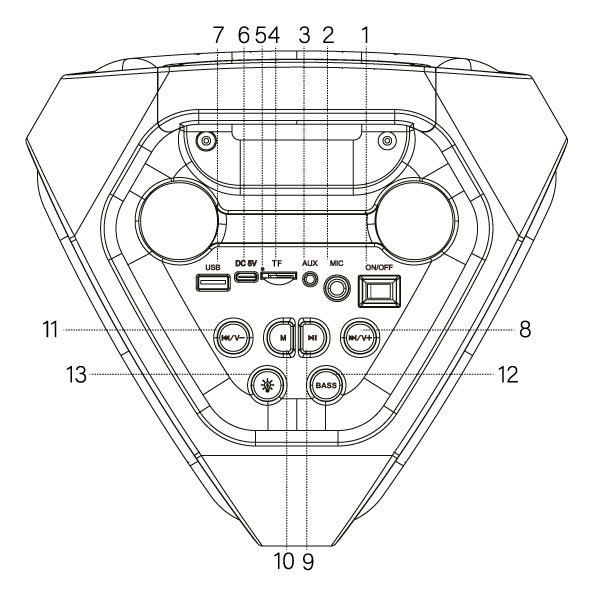
1. POWER Switch: Turns the speaker on or off.
2. MIC: Connect a microphone here.
3. AUX Input: 3.5 mm AUX input to connect auxiliary devices.
4. TF Card Slot
5. Charging Indicator:
Red = charging;
Light off = fully charged.
6. DC 5V: USB Type-C port to charge the speaker.
7. USB Port
8. NEXT / Volume +:
Press briefly to play the next track (or the next channel in FM mode).
Hold to increase the volume.
9. Play/Pause:
Press to play/pause the track.
Scan: In FM mode, hold to start automatic scanning of available channels. All scanned radio stations will be saved automatically.
TWS: Double-click to pair two speakers in TWS mode (two speakers are required – see the TWS section for details).
10. MODE (M): Press briefly to switch between modes (BT / FM / AUX / USB / TF Card)
11. PREV / Volume –:
Press briefly to play the previous track (or the previous channel in FM mode). Hold to decrease the volume.
12. BASS: Press to enhance the bass effect. Note: the sound effect resets to default settings every time the speaker is turned off.
13. LIGHT Button: Press briefly to switch between modes; hold to turn the lights on or off. Note: the light does not turn on in FM mode.
BLUETOOTH CONNECTION
- Place the speaker close (within 10 meters) to the Bluetooth device.
- If not in Bluetooth mode, press the Mode button repeatedly to switch to Bluetooth mode.
- Enable Bluetooth on your smartphone, tablet, or media player. Go to Bluetooth settings and search for new devices. The speaker’s Bluetooth name is "TM-JBK1406M".
- Once connected, briefly press the Previous or Next button to skip tracks.
USB / TF Card / AUX INPUT
- Insert a USB drive or a TF card, or connect an AUX device via AUX cable.
- Press the Mode button to select the correct mode (USB / TF / AUX).
- In AUX mode, control playback and volume from the connected device.
Note:
- Only MP3 format is supported.
- Maximum supported storage size: 32 GB (USB/TF Card).
MICROPHONE INPUT
- Connect a 6.3 mm jack microphone to the MIC input for karaoke.
FM RADIO
- Press the Mode button repeatedly to switch to FM Radio mode.
- Hold the Play/Pause button to automatically scan and save available FM channels.
- Use the Previous/Next buttons to switch between saved channels.
TRUE WIRELESS STEREO (TWS) MODE
(Requires two TM-JBK1406M speakers)
Pair two speakers for immersive stereo sound:
1. Make sure both speakers are powered on and in Bluetooth mode in the same room.
2. Double-press the Play/Pause button on one of the speakers to start pairing (confirmed by a beep).
3. On your device, enable Bluetooth and connect to "TM-JBK1406M" (one speaker). Audio will play in stereo from both speakers.
4. To exit TWS mode, double-press the Play/Pause button again.
Microphone instructions
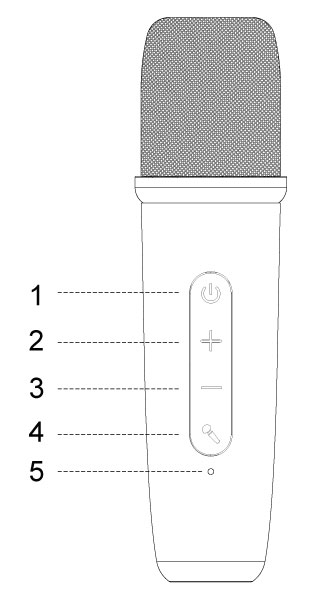
1. Power Button
Press and hold the power button to turn the wireless microphone on or off.
The wireless microphone will automatically connect to the device.
Once connected, the indicator light at position 5 will turn solid blue.
2. Volume +
Click this button to increase the microphone volume.
Hold to continuously increase the microphone volume.
3. Volume -
Click this button to decrease the microphone volume.
Hold to continuously decrease the microphone volume.
4. Voice Effect
During use, click this button to switch between different sound effects.
5. Indicator Light
Charging ---> Red light
Fully charged ---> From red to off.
Power on ---> Flashing blue light.
Connected ---> Solid blue light.
Power off ---> From blue to off.
P.S. To charge this wireless microphone,
connect a Type-C cable to the charging port
at the bottom.

| SAFETY | EN IEC 62368-1: 2020+A11:2020 |
| EMC | EN 301 489-1 V2.2.3 |
| EN 301 489-17 V3.2.4 | |
| EN 55032:2015+A11:2020 | |
| EN 55035:2017+A11:2020 | |
| EN IEC 61000-3-2:2019+A2:2024 | |
| EN 61000-3-3:2013+A2:2021 | |
| RADIO | ETSI EN 300 328 V2.2.2 |
| EN303345-1 V1.1.1 |
|
| EN303345-3 V1.1.1 |
|
| HEALTH | EN 62479: 201 |